Why LLM Summaries Break Coding Agents: The Case for Verbatim Context Pruning
Published: 2026-09-23
A plain-English deep dive into context compaction. Why traditional LLM summaries erase crucial stack traces and paths, and how fast-jev-compaction uses binary Jev decisions to keep context lean and lossless.
Step 1
The detective's desk problem: When AI memory becomes a burden
Picture a coding agent as a detective investigating a tricky software bug. Every codebase search, test run, and file inspection leaves another thick document on the desk. By the tenth step, the desk is buried under tens of thousands of tokens of terminal output. If left unmanaged, the agent slows down, API costs surge, and original user constraints get pushed out of view.
Step 2
Good intentions, bad outcomes: Why LLM summaries ruin the case
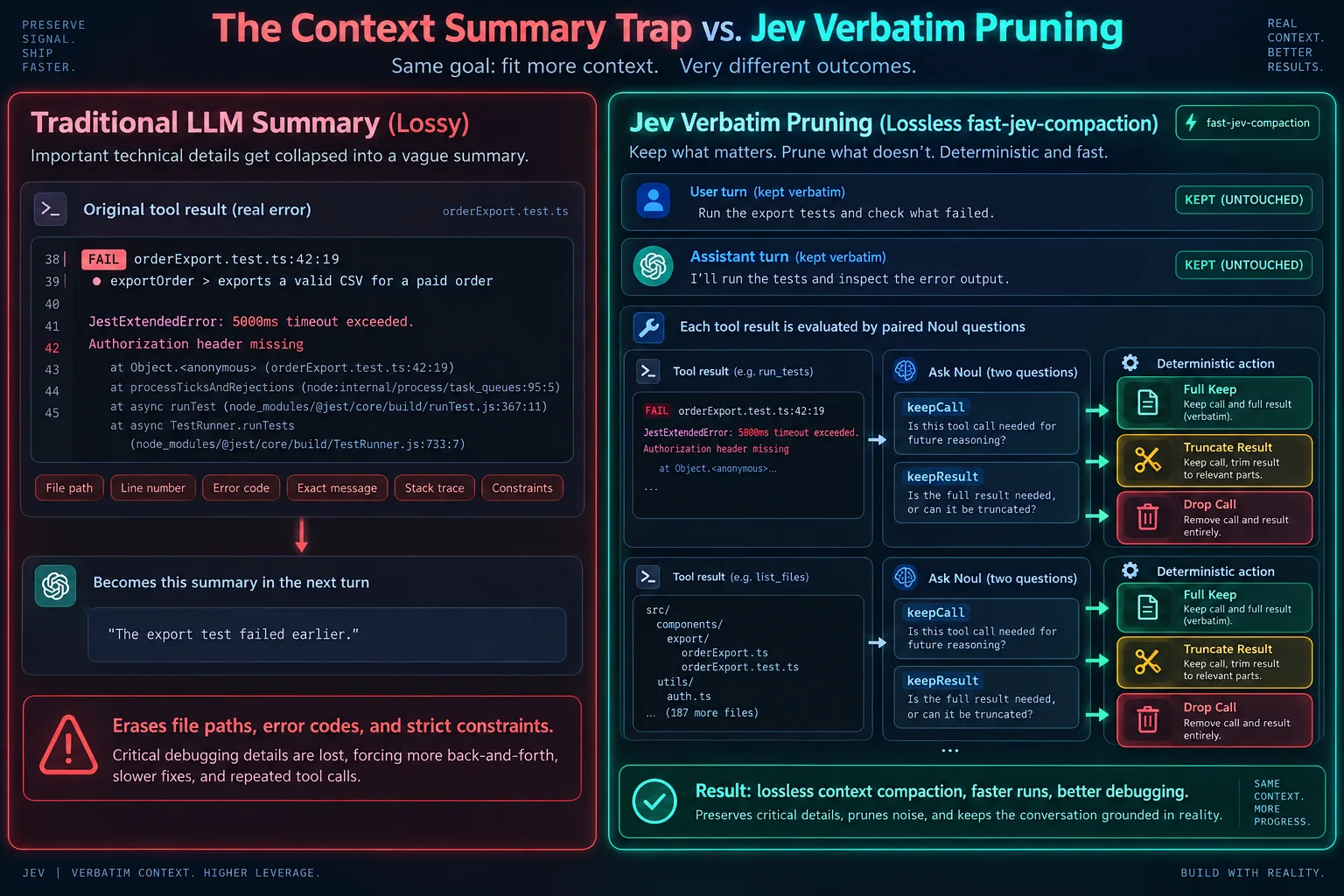
The traditional fix was having an LLM write an ongoing summary. But debugging code is not writing meeting notes! When the terminal clearly reported 'FAIL orderExport.test.ts:42:19, 5000ms timeout exceeded, Authorization header missing', an LLM summary compresses this into 'The export test failed earlier.' The high-level gist remains, but the exact file path, line number, and authentication requirement are discarded, leaving the agent unable to target the fix.
Step 3
A smarter paradigm: Never summarize, only judge what to keep
Since summarizing risks distorting facts, the better approach is never rewriting anything at all. In an agent transcript, up to 90% of token bloat comes from stale, verbose tool outputs. The open-source tool fast-jev-compaction treats Jev as a precise archivist that answers two clean yes/no questions: Does this tool call still matter? Does the full verbatim output still need to stay?
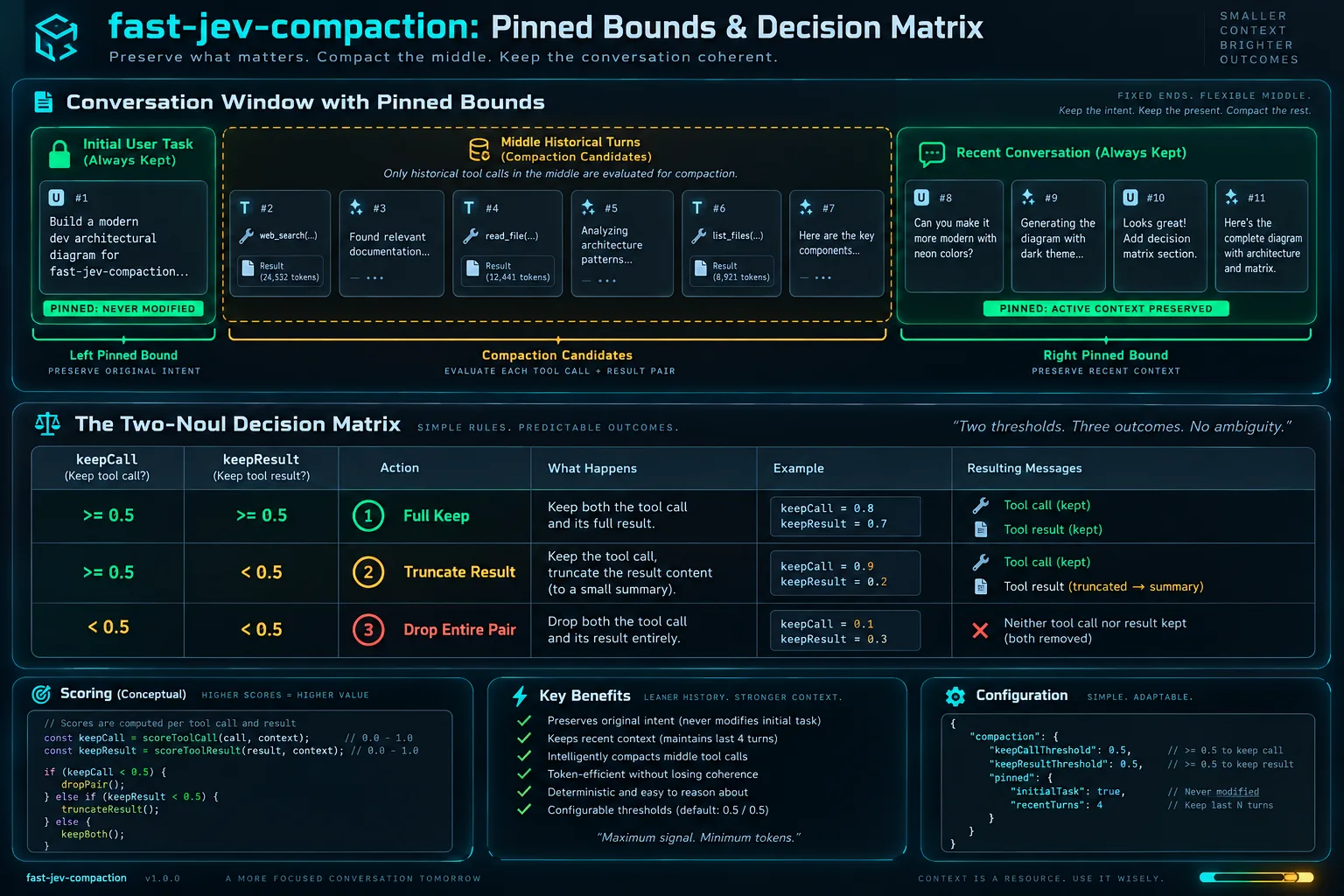
const calls = collectToolCalls(messages, config.preserveRecentMessages);
const candidates = calls.filter(call => !call.pinned);
// Only historical tool call and result pairs in the middle are candidates
Step 4
Two sacred rules: Pinned boundaries and atomic tool pairs
Before pruning, two areas are strictly protected: the user's initial prompt (the original requirement) and the newest conversation turns (the active reasoning state) are pinned and never modified. Furthermore, each tool invocation and its returned output are bound together by tool_use_id so orphan calls or results never confuse the model.
Step 5
Two narrow questions, three clean outcomes
Jev evaluates each historical tool pair without generating open-ended prose: if both call and result are critical, keep both verbatim; if knowing the command was run is enough but the output is stale, truncate the result to a one-line summary note; if the attempt was a dead end, drop both from history.
{
  "model": "jev-latest",
  "state": "User Goal: Fix auth timeout in order export.\nTool: execute_command(npm test)\nResult: FAIL orderExport.test.ts:42:19\nTimeout of 5000ms exceeded.\nExpected authorization header to be preserved.",
  "questions": {
    "keep_call": {
      "type": "noul",
      "instructions": "Does the agent still need to know that npm test was executed?"
    },
    "keep_result": {
      "type": "noul",
      "instructions": "Does the agent need the verbatim failure log and stack trace?"
    }
  }
}
Step 6
Engineered for speed, savings, and zero hallucination
Instead of waiting seconds for a heavy LLM to read 100,000 tokens and draft a summary that might misremember line numbers, Jev reviews candidate pairs in parallel batches in milliseconds for fractions of a cent. Crucially, every surviving file path and stack trace is 100% genuine, keeping the agent grounded in reality.
Related projects
- fast-jev-compaction — Claude Code plugin and npm library that asks Jev which tool calls to keep, instead of summarizing the transcript.
- jev-sentinel — Pi, Claude Code, and Codex CLI guard that asks Jev whether a tool call is on-task, risky, or injected before it runs.
- @typesafe-ai/sdk — Official TypeScript/JavaScript client for POST https://api.typesafe.ai/v1/systemone.