The Dual-Speed Agent: Coupling Codex with Jev for Fast Harness Decisions
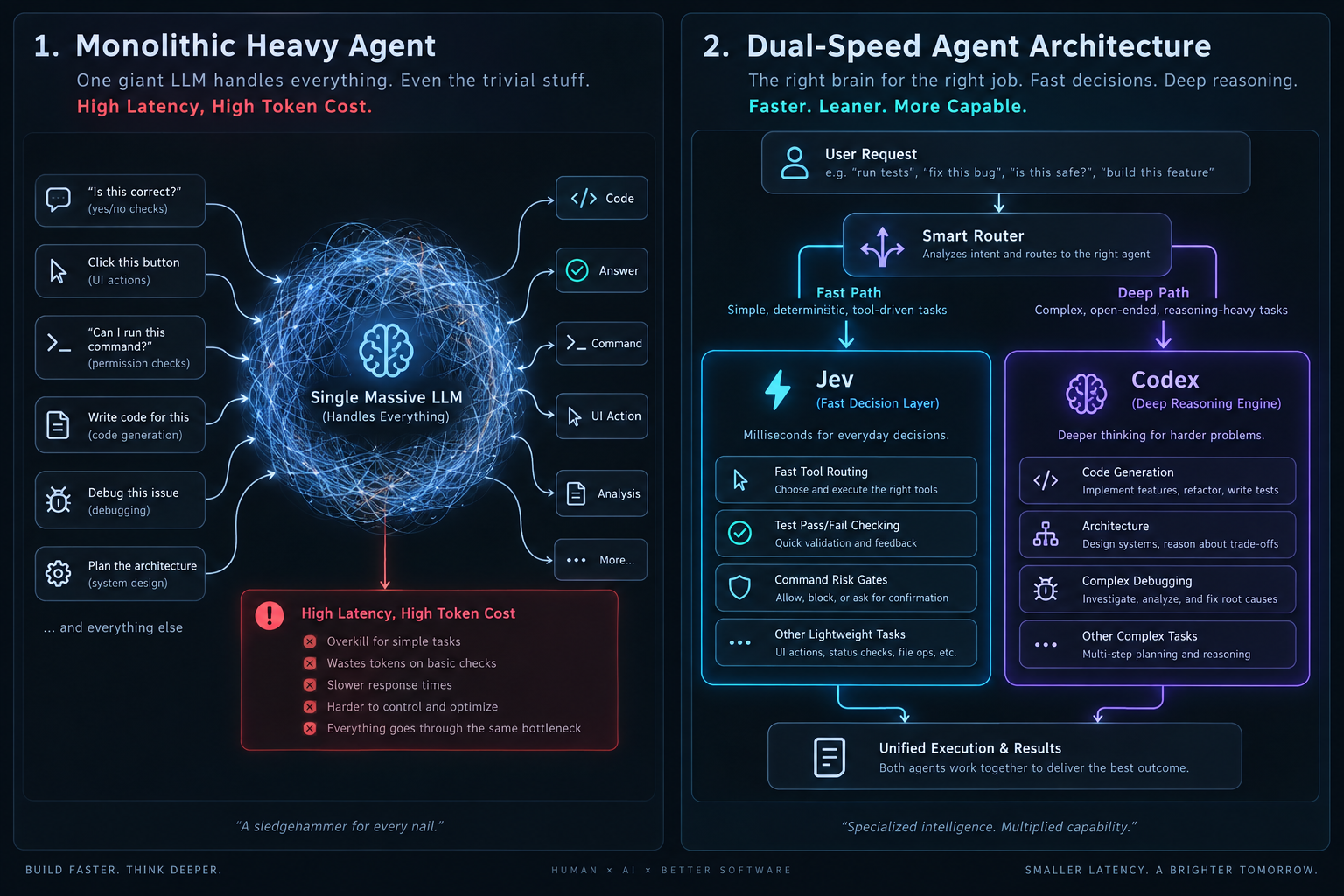
Decouple deep reasoning from instant decisions. Use Codex as the engineer for architecture and code, and Jev as the fast evaluator, router, and risk gatekeeper.
Step 1
Recognize the monolithic agent bottleneck
Coding agents often send every trivial yes/no question, permission check, and test verification to their heaviest reasoning model. This wastes token budget and adds seconds of latency to loops that should be instantaneous. In a dual-speed system, heavy LLMs like Codex handle deep reasoning, while Jev handles instant micro-decisions.
Step 2
Route tools with Choice instead of asking for prose
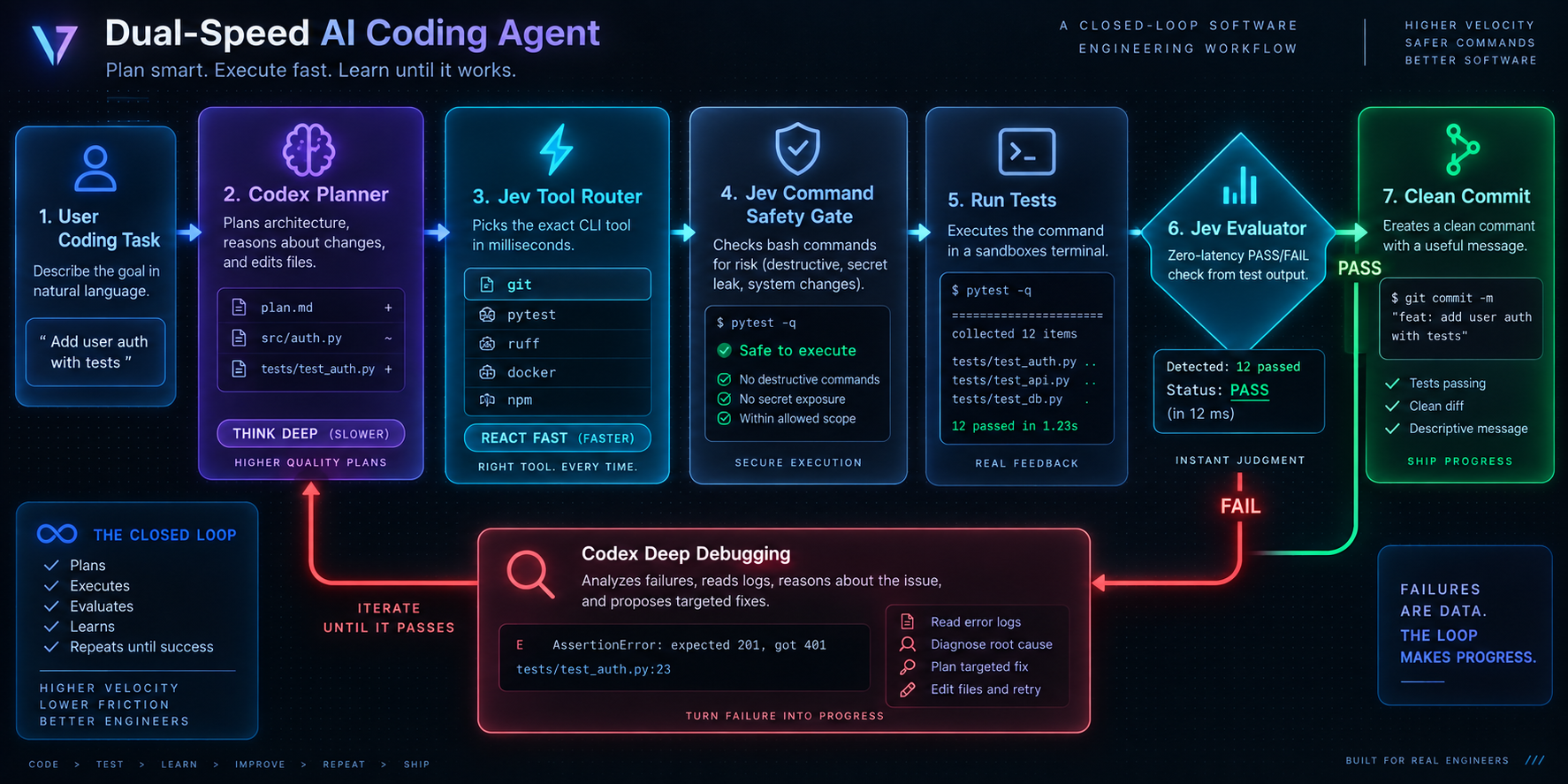
When an agent needs to pick the best tool among a known set (e.g. ripgrep vs browser vs terminal), do not ask for a paragraph explaining why. A single Choice question returns the selected tool identifier in milliseconds without token overhead.
{
  "model": "systemone",
  "state": "Goal: Locate PlayerHealth definition in the codebase.",
  "questions": [
    {
      "type": "choice",
      "id": "next_tool",
      "instruction": "Select the best tool for this lookup.",
      "options": [
        {
          "id": "grep",
          "label": "Codebase search (ripgrep)"
        },
        {
          "id": "browser",
          "label": "Web browser"
        },
        {
          "id": "runtime",
          "label": "Launch executable"
        },
        {
          "id": "git_log",
          "label": "Git history"
        }
      ]
    }
  ]
}
Step 3
Intercept destructive bash commands with a Risk Gate
Before executing terminal commands like git reset --hard, run a Jev Choice or Score risk gate. Low-risk operations execute automatically, medium-risk actions prompt the user, and dangerous commands are blocked before touching disk.
{
  "model": "systemone",
  "state": "Pending command: git reset --hard origin/main",
  "questions": [
    {
      "type": "choice",
      "id": "risk_tier",
      "instruction": "Classify operational risk of this command.",
      "options": [
        {
          "id": "routine",
          "label": "Safe or read-only"
        },
        {
          "id": "review",
          "label": "Requires user confirmation"
        },
        {
          "id": "dangerous",
          "label": "Destructive or irreversible"
        }
      ]
    }
  ]
}
Step 4
Verify test suites with a zero-latency Noul Evaluator
After running npm test or pytest, pass the exit code and summary to a Noul question. If probability of clean pass is high, proceed immediately to git commit. If it fails, escalate back to Codex for root-cause diagnosis.
{
  "model": "systemone",
  "state": "npm test returned exit code 0. 128 passed. 0 failed.",
  "questions": [
    {
      "type": "noul",
      "id": "tests_passed",
      "instruction": "Did the test suite finish with zero failures?"
    }
  ]
}
Step 5
Benchmark: Compare latency and deterministic reliability
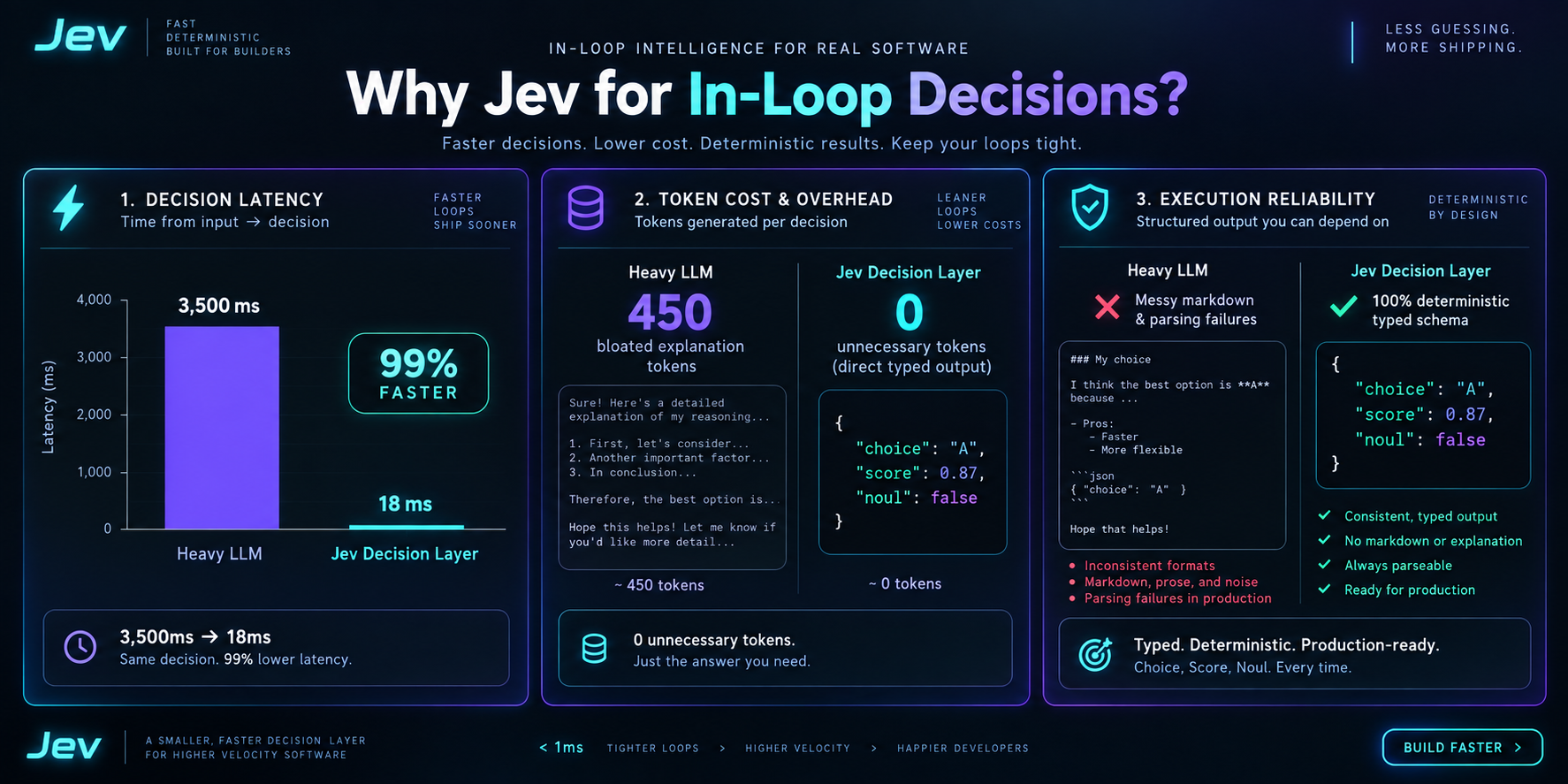
Compared to standard LLMs that generate 450+ tokens of conversational reasoning over 3,500ms, Jev responds in 18ms with 0 token fluff and strict typed outputs. This eliminates Markdown JSON extraction failures in autonomous loops.
Step 6
Embed the division of labor in AGENTS.md
Do not manually prompt the agent on each turn. Document the boundary in your project memory: instruct Codex to use Jev for pass/fail checks, tool routing, and risk gating, while reserving Codex for code authoring, multi-file debugging, and architecture design.
## Jev Routing Rules
Use Jev for decisions that do not require generating prose:
- Test pass/fail verification
- Tool selection from a known set
- Terminal command risk classification
- Continue vs retry vs halt gates

Keep Codex focused on:
- Writing and refactoring code
- Multi-file debugging
- Architectural planning
Related projects
- fast-jev-compaction — Claude Code plugin and npm library that asks Jev which tool calls to keep, instead of summarizing the transcript.
- jev-sentinel — Pi, Claude Code, and Codex CLI guard that asks Jev whether a tool call is on-task, risky, or injected before it runs.
- @typesafe-ai/sdk — Official TypeScript/JavaScript client for POST https://api.typesafe.ai/v1/systemone.